
One-Stop VLA Development Toolbox for Embodied Intelligence




Pretraining · Fine-tuning · Inference · Evaluation
Supporting mainstream policies such as π0, CogACT, OFT, MemVLA, and more
Introduction
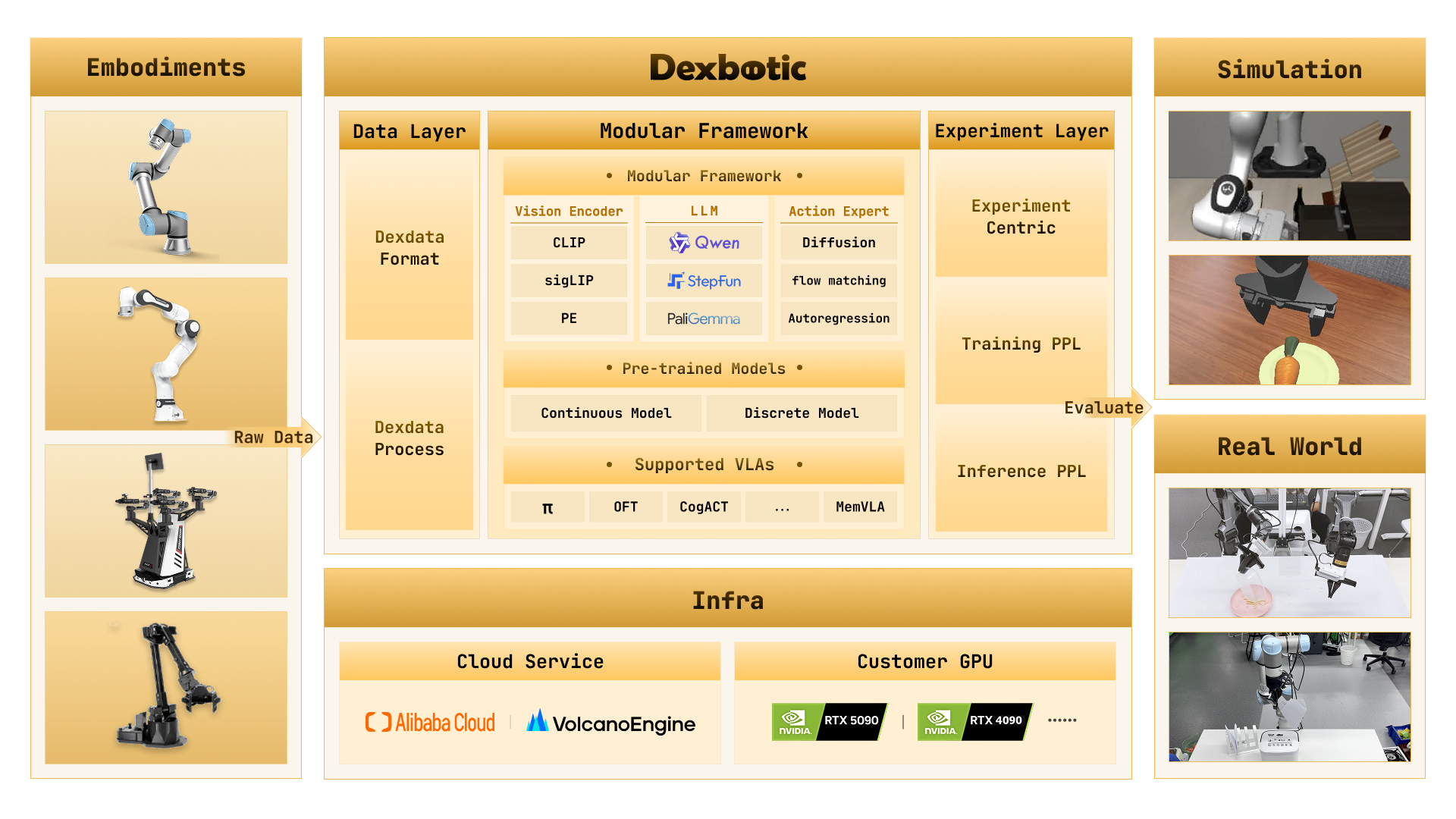
Dexbotic is a VLA (Vision-Language-Action) development toolbox built on the PyTorch framework, designed to provide a unified and efficient solution for embodied intelligence research. It comes with built-in environment configurations for various mainstream VLA models, allowing users to reproduce, fine-tune, and inference cutting-edge VLA algorithms with simple setup.
- Ready-to-Use VLA Framework: Centered around VLA models, integrating embodied manipulation and navigation capabilities, supporting multiple cutting-edge algorithms.
- High-Performance Pre-trained Foundation Models: For mainstream VLA algorithms such as π0 and CogACT, Dexbotic provides multiple optimized pre-trained models.
- Modular Development Architecture: Adopting a "layered configuration + factory registration + entry dispatch" architecture, users can easily modify configurations, change models, or add tasks by simply modifying experimental scripts.
- Unified Cloud and Local Training: Fully supports both cloud and local training needs, supporting cloud training platforms such as Alibaba Cloud and Volcano Engine, while also accommodating consumer-grade GPUs for local training.
- Extensive Robot Compatibility: For mainstream robots such as UR5, Franka, and ALOHA, Dexbotic provides a unified training data format and deployment scripts.
Quick Start
We strongly recommend using Docker for development or deployment to get the best experience.
1. Installation and Environment Setup
# 1. Clone the repository
git clone https://github.com/dexmal/dexbotic.git

# 2. Start Docker container
docker run -it --rm --gpus all --network host \
  -v $(pwd)/dexbotic:/dexbotic \
  dexmal/dexbotic \
  bash

# 3. Activate environment and install dependencies
cd /dexbotic
conda activate dexbotic
pip install -e .
System Requirements: Ubuntu 20.04/22.04, recommended GPUs: RTX 4090, A100, or H100 (8 GPUs recommended for training, 1 GPU for deployment).
Using on Blackwell GPUs
For users with Blackwell architecture GPUs (e.g., B100, RTX 5090), please use the specialized Docker image dexmal/dexbotic:c130t28.
# 1. Start Docker with Blackwell image
docker run -it --rm --gpus all --network host \
  -v /path/to/dexbotic:/dexbotic \
  dexmal/dexbotic:c130t28 \
  bash

# 2. Activate environment
cd /dexbotic
pip install -e .
2. Usage Guide
Benchmark Results
The following shows a comparison of evaluation results between models trained with Dexbotic and original models on mainstream simulation environments. View more detailed evaluation results: Benchmark Results
Libero
| Model | Average | Libero-Spatial | Libero-Object | Libero-Goal | Libero-10 |
|---|---|---|---|---|---|
| CogACT | 93.6 | 97.2 | 98.0 | 90.2 | 88.8 |
| DB-CogACT | 94.9 | 93.8 | 97.8 | 96.2 | 91.8 |
| π0 | 94.2 | 96.8 | 98.8 | 95.8 | 85.2 |
| DB-π0 | 93.9 | 97 | 98.2 | 94 | 86.4 |
| MemVLA | 96.7 | 98.4 | 98.4 | 96.4 | 93.4 |
| DB-MemVLA | 97.0 | 97.2 | 99.2 | 98.4 | 93.2 |
| DB-GR00TN1 | 94.8 | 93.0 | 99.6 | 95.2 | 91.4 |
CALVIN
| Model | Average Length | 1 | 2 | 3 | 4 | 5 |
|---|---|---|---|---|---|---|
| CogACT | 3.246 | 83.8 | 72.9 | 64.0 | 55.9 | 48.0 |
| DB-CogACT | 4.063 | 93.5 | 86.7 | 80.3 | 76.0 | 69.8 |
| OFT | 3.472 | 89.1 | 79.4 | 67.4 | 59.8 | 51.5 |
| DB-OFT | 3.540 | 92.8 | 80.7 | 69.2 | 60.2 | 51.1 |
SimplerEnv
| Model | Average | Spoon | Carrot | Stack Blocks | Eggplant |
|---|---|---|---|---|---|
| CogACT | 51.25 | 71.7 | 50.8 | 15 | 67.5 |
| DB-CogACT | 69.45 | 87.5 | 65.28 | 29.17 | 95.83 |
| OFT | 30.23 | 12.5 | 4.2 | 4.2 | 100 |
| DB-OFT | 76.39 | 91.67 | 76.39 | 43.06 | 94.44 |
| MemVLA | 71.9 | 75.0 | 75.0 | 37.5 | 100.0 |
| DB-MemVLA | 84.4 | 100.0 | 66.7 | 70.8 | 100.0 |
ManiSkill2
| Model | Average | PickCube | StackCube | PickSingleYCB | PickSingleEGAD | PickClutterYCB |
|---|---|---|---|---|---|---|
| CogACT | 40 | 55 | 70 | 30 | 25 | 20 |
| DB-CogACT | 58 | 90 | 65 | 65 | 40 | 30 |
| OFT | 21 | 40 | 45 | 5 | 5 | 0 |
| DB-OFT | 63 | 90 | 75 | 55 | 65 | 30 |
| π0 | 66 | 95 | 85 | 55 | 85 | 10 |
| DB-π0 | 65 | 95 | 85 | 65 | 50 | 30 |
RoboTwin2.0
| Model | Average | Adjust Bottle | Grab Roller | Place Empty Cup | Place Phone Stand |
|---|---|---|---|---|---|
| CogACT | 43.8 | 87 | 72 | 11 | 5 |
| DB-CogACT | 58.5 | 99 | 89 | 28 | 18 |
FAQ
Q: Failed to install Flash-Attention
A: For detailed installation instructions and troubleshooting, please refer to the official documentation at https://github.com/Dao-AILab/flash-attention.
Q: Converting RLDS/LeRobot to Dexdata
A: We provide a general data conversion guide in data conversion. An example of Lerobot data conversion can be found in convert_lerobot_to_dexdata, and an example for RLDS data conversion is available in convert_rlds_to_dexdata.
Q: Is 5090 supported?
A: Yes, please refer to Using on Blackwell GPUs.
Support Us
We are continuously improving, with more features coming soon. If you like this project, please give us a star on GitHub 
If Dexbotic has been helpful in your research work, please consider citing our technical report:
@article{dexbotic,
  title={Dexbotic: Open-Source Vision-Language-Action Toolbox},
  author={Dexbotic Contributors},
  journal={arXiv preprint arXiv:2510.23511},
  year={2025}
}
License
This project is licensed under the MIT License.